Skip to content
Pillar I: The Knowledge Foundation
Before an agent can act, it needs to know things — specifically, your things. Not generic LLM knowledge, but your contracts, your reports, your internal wikis.
The standard approach of uploading documents manually hits a ceiling fast. NotebookLM, for example, is a solid entry point for document analysis, but it comes with source caps and no programmatic export — which makes it unsuitable as the backbone of any automation pipeline at scale.
The production-grade alternative is a vector database that stores dense numerical representations of your content and enables semantic search based on meaning, not just keywords. Combined with a hybrid BM25 + vector retrieval approach, this has been shown to improve retrieval accuracy by 15–25%.
Parsing the raw data is the first technical challenge. PDFs, financial reports, scanned forms — standard text extraction loses structure. The right tool depends on the document type:
| Framework | Best For | Table Accuracy |
|---|---|---|
| LlamaParse | Real-time ingestion, RAG pipelines | High |
| Docling | Complex table fidelity (97.9%) | Superior |
| Unstructured.io | 25+ file formats | Balanced |
| Reducto | Forms and handwriting | SOTA for rotated tables |
For enterprise environments where different departments share infrastructure but not data, the vector layer must support multi-tenancy — logical isolation of HR, Finance, and other datasets under the same roof via namespaces and role-based access control. Pinecone, Weaviate, Qdrant, and pgvector each handle this differently; the right choice depends on your workload profile and whether you need hybrid search, real-time updates, or SQL integration alongside vectors.
Pillar II: The Orchestration Layer
AI agents for business automation with a knowledge base without reasoning are a library without a librarian. The orchestration layer is what turns raw context into decisions and actions.
Two frameworks dominate this space, and they represent different philosophies:
CrewAI models a team of specialists — each agent has a role, a goal, a backstory. Practical for mapping existing human processes to AI and fast to prototype. A “Lead Qualification Agent” hands off to a “Research Assistant” the same way your team does.
LangGraph is lower-level and graph-based — workflows are nodes and edges, and the system is inherently stateful. It supports cyclical loops (the agent can self-correct), persistent memory across sessions, and human-in-the-loop checkpoints where a process pauses for approval and resumes without losing context. For production environments, this is the more reliable foundation.
Beyond the framework, the quality of an agent’s output depends on its reasoning strategy:
- Chain-of-Thought (CoT): decompose the task into intermediate steps before committing to an answer
- Tree-of-Thought (ToT): evaluate multiple paths in parallel, then choose the optimal one
- Reflection: the agent critiques its own plan before executing it in an external system
These aren’t academic curiosities — they’re the mechanisms that determine whether your agent gives you a defensible recommendation or a confident mistake.
Pillar III: Google Stitch and the Design Loop
Most agentic architectures stop at data and logic. Ours goes further.
Google Stitch is an AI-native design canvas that converts natural language descriptions into high-fidelity UI designs and production-ready front-end code (HTML + Tailwind CSS). The Stitch SDK allows an agent to interact with UI projects programmatically — generating or modifying screens autonomously based on business objectives.
What this means in practice: an agent doesn’t just recommend a landing page strategy. It builds a prototype of it. The Stitch SDK exposes methods like project.generate(prompt) that return a deployable screen — not a mockup, deployable code.
Stitch also introduces DESIGN.md, an agent-readable markdown format for design systems. By analyzing an existing URL, the tool can extract brand tokens — colors, typography, component styles — and apply them to any new screen it generates. Processing time: 15–45 seconds.
This closes the loop between strategy and execution in a way that most automation stacks don’t.
Pillar IV: API Integrations — What Gives the Agent Hands
An agent that can only generate text is a sophisticated document. An agent with API access is an operator.
The standardized layer for connecting agents to external tools is the Model Context Protocol (MCP) — an open protocol that acts as a universal connector between AI agents and external data sources or services. Google provides managed remote MCP servers for BigQuery, Google Maps, GKE, and others. Connect the endpoint, and the agent discovers available tools automatically.
For domain-specific environments, the integrations go deeper. In the mortgage and real estate sector, for instance, an agent connected to Newton Velocity via its REST API can monitor deal pipeline webhooks, detect status changes, pull deal data, generate a summary, and notify the account manager — without a human initiating any step.
The same architecture scales to any CRM, ERP, or internal system with an API surface.
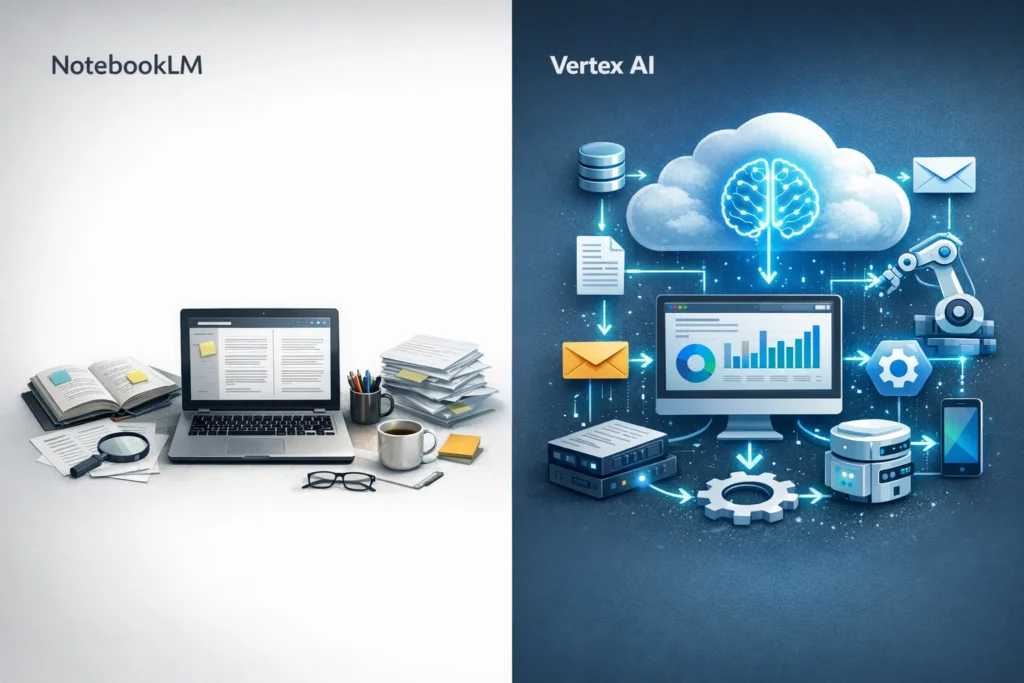
From NotebookLM to Vertex AI: The Scaling Break Point
There’s a clear ceiling where individual tools stop being sufficient:
| Capability | NotebookLM | Vertex AI Agent Builder |
|---|---|---|
| Data grounding | Manual source lists | Enterprise-wide vector search |
| Actionability | Informational only | Executable tools (APIs, code) |
| Governance | Minimal | RBAC, audit logs, security |
| Automation | Manual uploads | Automated connectors (S3, Drive) |
Vertex AI Agent Builder supports context windows up to 2M tokens and connects natively to enterprise data via Vertex AI Search. The transition from NotebookLM to Vertex AI is essentially the transition from a research tool to a system of action.
Security Is Not Optional at This Level
Autonomous agents with API access are a security surface. The governance layer must be part of the architecture from day one, not bolted on after deployment:
- Dual-gate access control: agents pass through an MCP Gate (tool access) and a Service Gate (underlying permissions) — separately
- Audit logging: full trace of agent interactions via Vertex Trace Explorer and Gemini/NotebookLM Enterprise logs
- PII masking: sensitive fields detected and tokenized before reaching the reasoning model
- Confidence scoring: low-confidence decisions automatically escalate to a human operator rather than executing
What Comes Next
The Agent2Agent (A2A) protocol — currently in development across Google, OpenAI, and Salesforce — will allow agents from different vendors to collaborate in coordinated workflows. Combine that with multimodal models like Gemini 2.5 (live camera, real-time audio), and the operational boundary of a Digital Employee expands considerably.
The Short Version
The four-pillar architecture — knowledge base, orchestration, design integration, API connectivity — is not a roadmap for 2030. The components exist, they’re production-tested, and the implementation cost is a fraction of what running the equivalent human workflow costs at scale.
If you’re still at the “AI chatbot on the website” stage, the gap to an autonomous Digital Employee is real — but it’s bridgeable with the right stack and the right sequence of steps.
That’s exactly what we build at Coderfy.